Welcome to My IMT 561 Portfolio

Susan Zhang ([optional pronouns])

I am a master’s student in [program], focused on [interest area or domain].

This quarter I want to get better at interaction design.

One dataset or topic I am excited to visualize is [topic], because [short reason].

Documenting iterative process

Context of use: I designed this clock for people who want to track their cooking time in a fun and engaging way. Instead of a traditional timer, this clock uses a visual representation of a cooking process, where the user can see the progression of a meal being prepared. It is ideal for home cooks who want a more interactive and visually appealing way to manage their cooking time, making the experience more enjoyable and less stressful.

Self-reflection / future work:

  • I would add more dish choices instead of just making a breakfast to make the experience more engaging. Some dishes could be soup, pasta, steak, stir-fry, ramen, etc.
  • I would like to add more realistic art pieces for all the cliparts in the clock and make sure they are original art drawings and have the same artstyle. I want to do it because I want to make the clock more visually appealing.

Sketch evolution

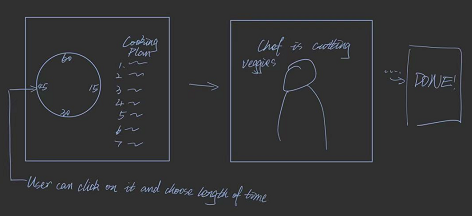
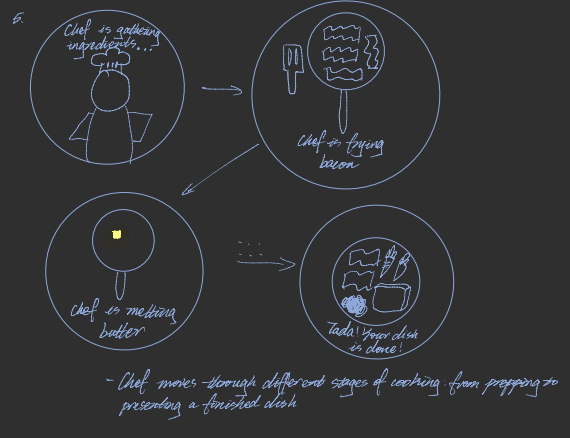
Homework 4 sketch 1 initial hand-drawn iteration showing the breakfast clock cooking sequence
Step 1 - This image depicts the different stages of cooking. After the user chooses a time, the chef on the interface will start cooking and will proceed through different steps of making a delicious meal.
Homework 4 sketch 1 revised hand-drawn iteration showing the timer layout and cooking flow
Step 2 - I got feedback from my friend who loves cooking that I should help users envision how they could choose the length of time. I added the page where users can click to choose the length of time they desired, between 1 minute and 60 minutes. I also included a breakdown of the tasks it will take the chef avatar to finish each step on the right.
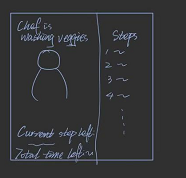
Homework 4 sketch 1 third hand-drawn iteration showing the chef, steps panel, and countdown layout
Step 3 - To improve visibility of the interface, I included a status tracker on the right. It shows which step the chef avatar is doing now and which steps it has finished. I also included how much time is left for the current step and how much time is left for the whole task.

Documenting iterative process

.

Context of use: I designed this clock for people who are unsure about how long they should cook their eggs for. With a traditional timer, they cannot visualize the doneness of their eggs and could end up with either overcooked or undercooked eggs. It is ideal for anyone who wants to save time and energy cooking an egg without Googling it online. It is also a fun way to visualize the cooking process of the egg.

Final Clock 2

Sketch iteration documentation (paper/hand-drawn photos)

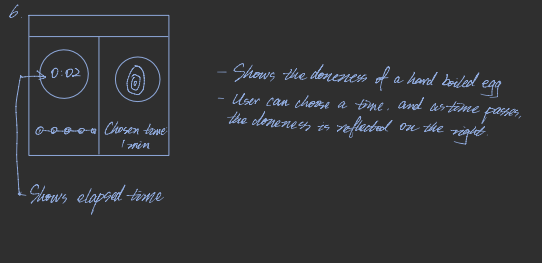
Homework 4 sketch 2 first hand-drawn iteration showing the elapsed-time panel and egg doneness preview
Step 1 — This sketch includes a time-elapsed clock on the left and status of a hard-boiled egg on the right. It also shows the length of time chosen by the user.
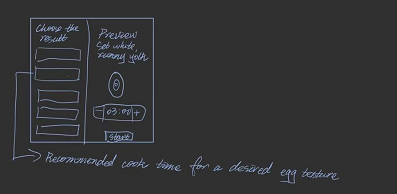
Homework 4 sketch 2 revised hand-drawn iteration showing the chosen texture preview and recommended cook time
Step 2 — Based on the feedback I got from my roommate, I included a clickable increase and decrease part for the length of time, which increases or decreases at an increment of 30 seconds. To help visualize the length of time passed, I also included a preview of the doneness of the egg for the length of time selected. I also show a chart of recommended cook time for desired doneness of the egg.

Self-reflection / future work:

  • Add more types of ingredients the user can choose from, for example, steak, toast, bacon, asparagus, and different kinds of vegetables, and create a database for how long each item should be cooked. I want to add more ingredients so that this app could be used for more than one single ingredient.
  • Add more cooking methods, such as stir-fry, baking, grilling, and broiling. I want to do this to imitate the different cooking needs and instructions the user wants.

Adapted from Golan Levin, 2016-2018

Documenting iterative process

by Raizel Lagunero — source code

Context of use: This clock is based on a bookshelf that adds to the cozy, focused ambiance of studying.

Ex 10

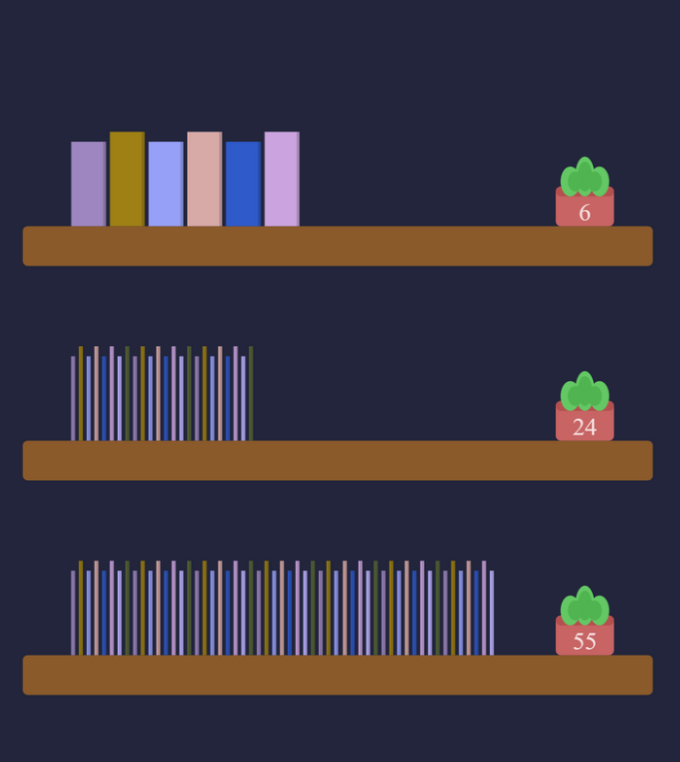
Design process: Each shelf represents either the hour, minute, or second of the day. The number of books per shelf represents that amount, and the potted plant shows the time for quick understanding. The background color represents AM and PM by light and dark shades, respectively, helping users intuitively recognize the time while maintaining a relaxed study atmosphere. This design is meant to be used as a background webpage to use while studying.

Self-reflection / future work: Improve this design by adding more visual details, textures, and lighting effects that enhance a peaceful and studious scene.

Sketch evolution

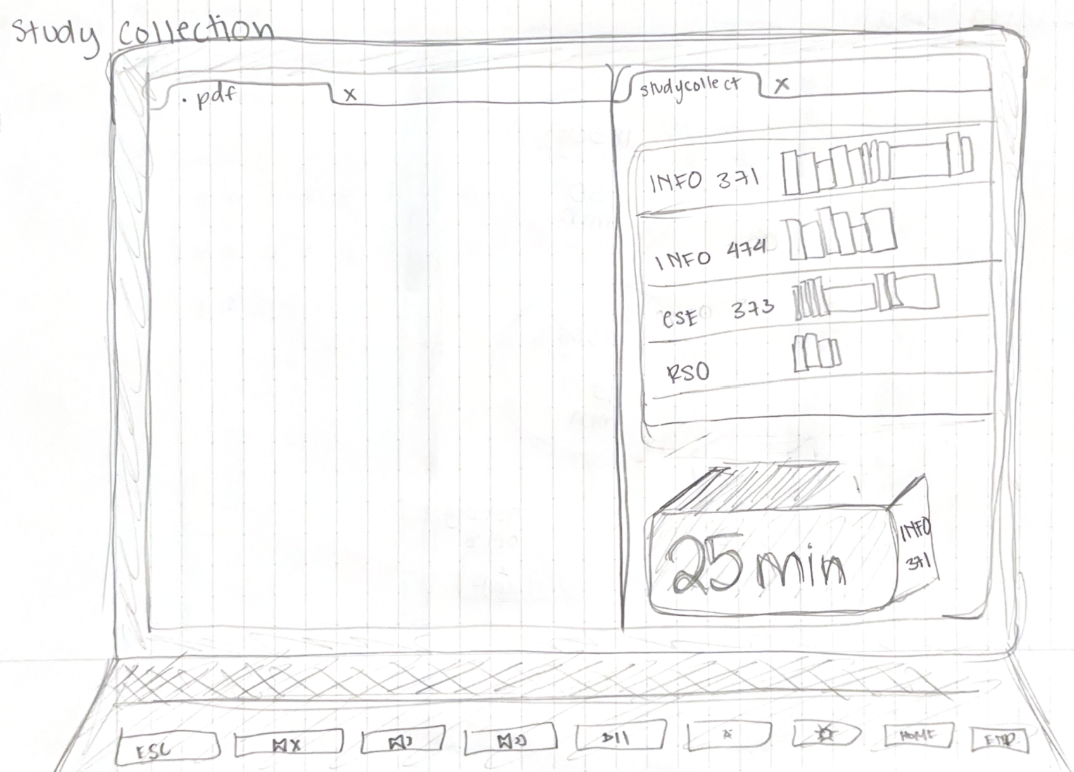
Ex 10 sketch evolution step 1
Step 1 — This sketch depicts timer that is represented by books on a bookshelf. It had features of representing a student's classes and the amount of time that was studied per class. However, this design was too cluttered and did not fit the ambiant visualization that I had envisioned.
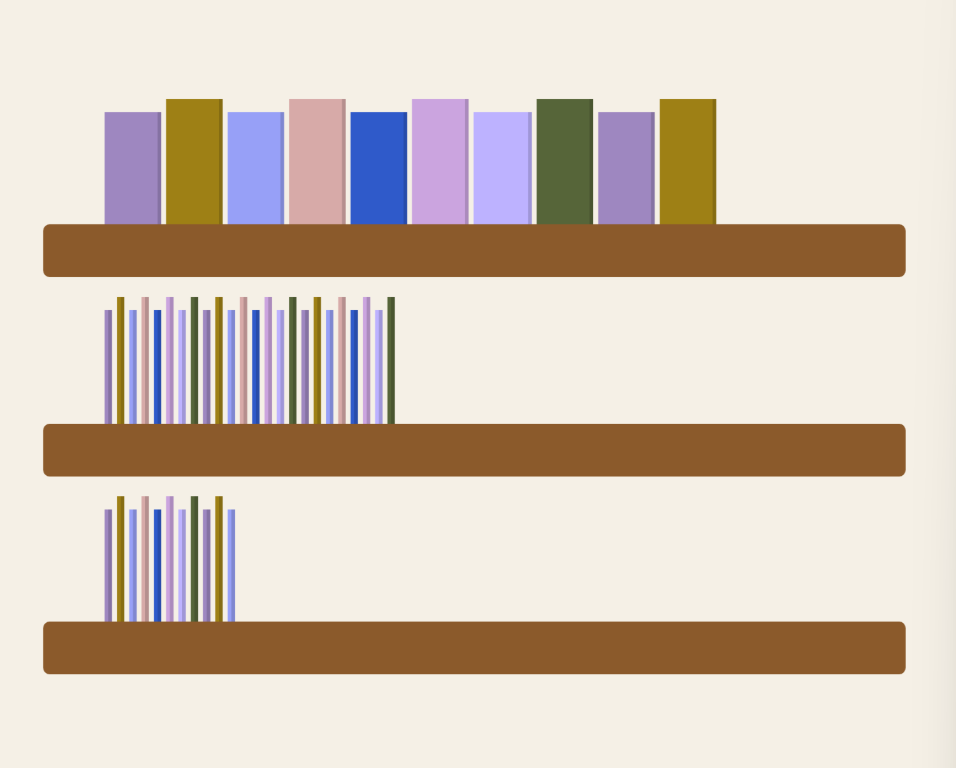
Ex 10 sketch evolution step 2
Step 2 — I simplified the design to only include three simple bookshelves, and instead of a timer, I implemented a clock. However, I recieved feedback that it was difficult to immediately count how many books were in each shelf, and it the clock did not show whether it was in the AM or PM.
Ex 10 sketch evolution step 3
Step 3 — I added numeric labels on potted plants at the end of each shelf to allow the user to quickly understand what time it was. I also added a background feature that reflected what time of day it is; light background represents AM, and dark represents PM.

Documenting iterative process

by Yongxi Chen — source code

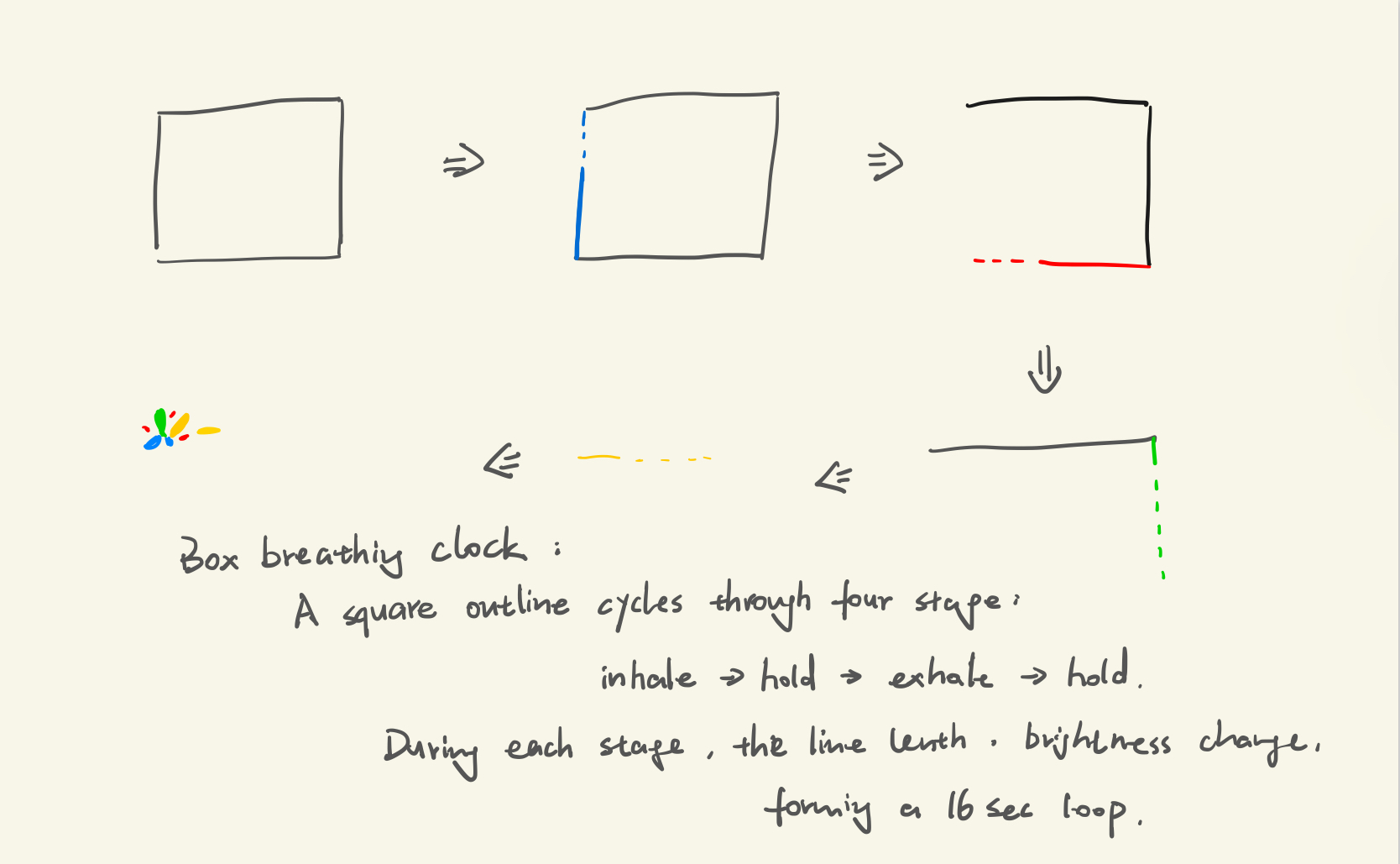
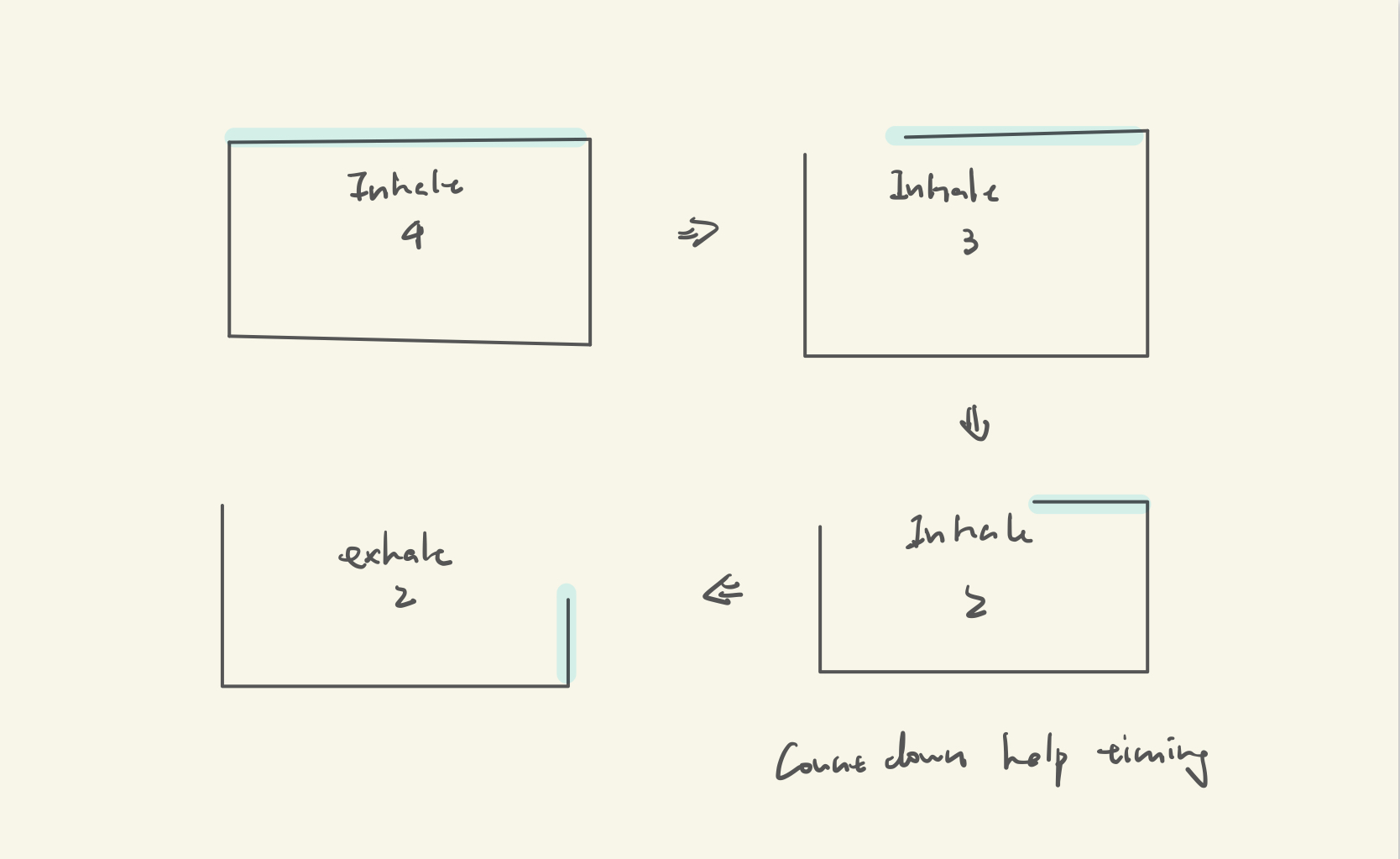
Context of use: This sketch represents the rhythm of box breathing, a meditation technique used to calm the mind and reduce stress by maintaining a steady 4-4-4-4 breathing cycle: breathe in, hold, breathe out, hold. It is designed for mindfulness practice, stress management sessions, and focus exercises where users need visual and temporal guidance to regulate their breathing.

Ex 11

Design process:

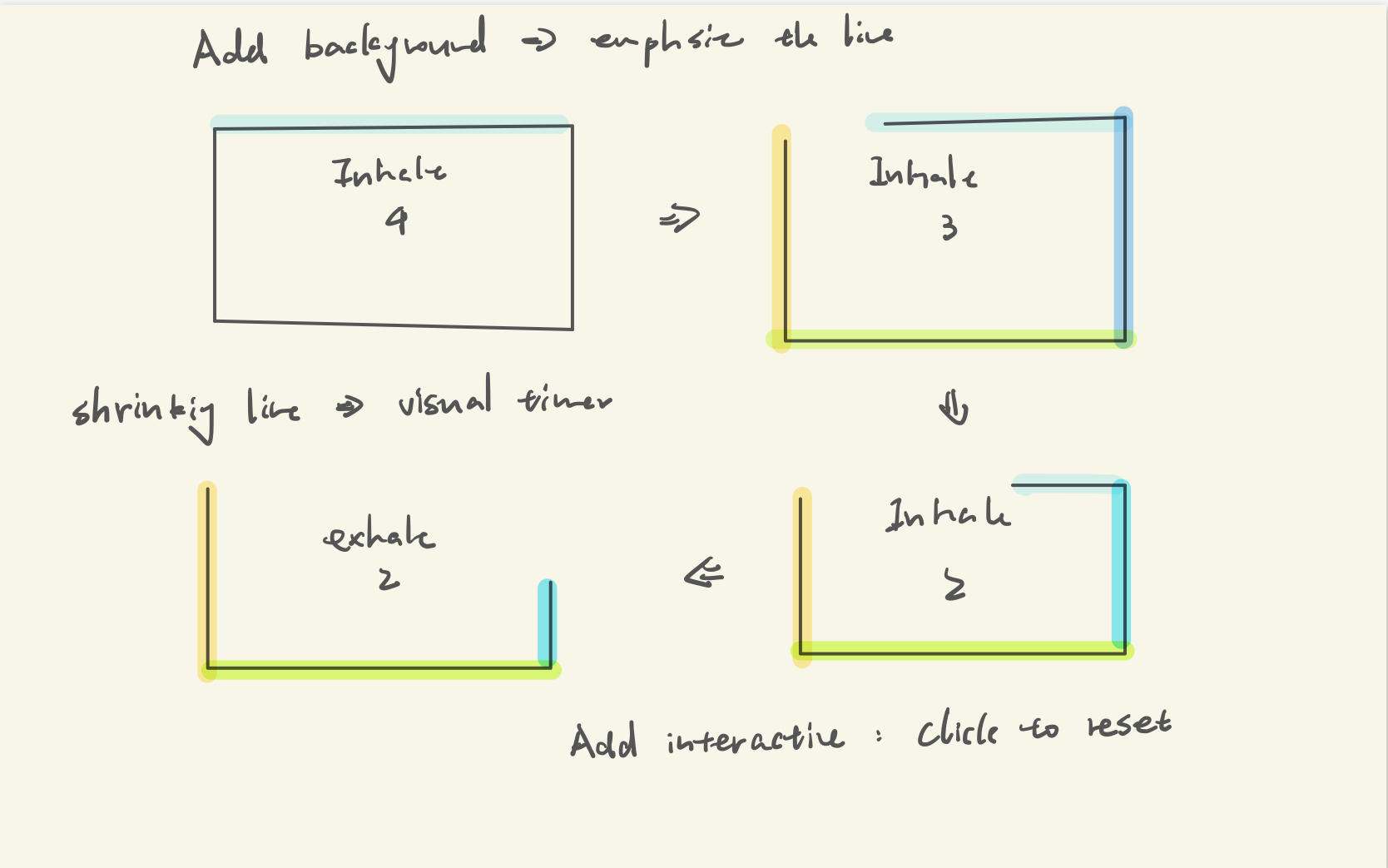
  1. Square path visualization: The breathing cycle is represented by a square with four edges, where each edge corresponds to one breathing phase. A colored line progressively draws around the square, providing clear visual tracking of the 4-second intervals. The square shape reinforces the "box breathing" concept.
  2. Color-coded phases: Each of the four phases uses a distinct teal-to-gray gradient color (teal for inhale, light blue for first hold, mint for exhale, gray for second hold).
  3. Countdown timer with neon glow: Large text displays the current phase label. The neon glow effect on the lines creates a calming, modern aesthetic while maintaining high visibility against the starry background.

Self-reflection / future work: Add customizable breathing durations (e.g., 3-3-3-3 or 5-5-5-5 cycles) to accommodate different skill levels. Include audio cues or gentle sound at phase transitions to support eyes-closed practice.

Sketch evolution

Ex 11 sketch evolution step 1
Step 1 — Initial layout
Ex 11 sketch evolution step 2
Step 2 — After peer feedback
Ex 11 sketch evolution step 3
Step 3 — Final refined version

Documenting iterative process

by Teresa Wang — source code

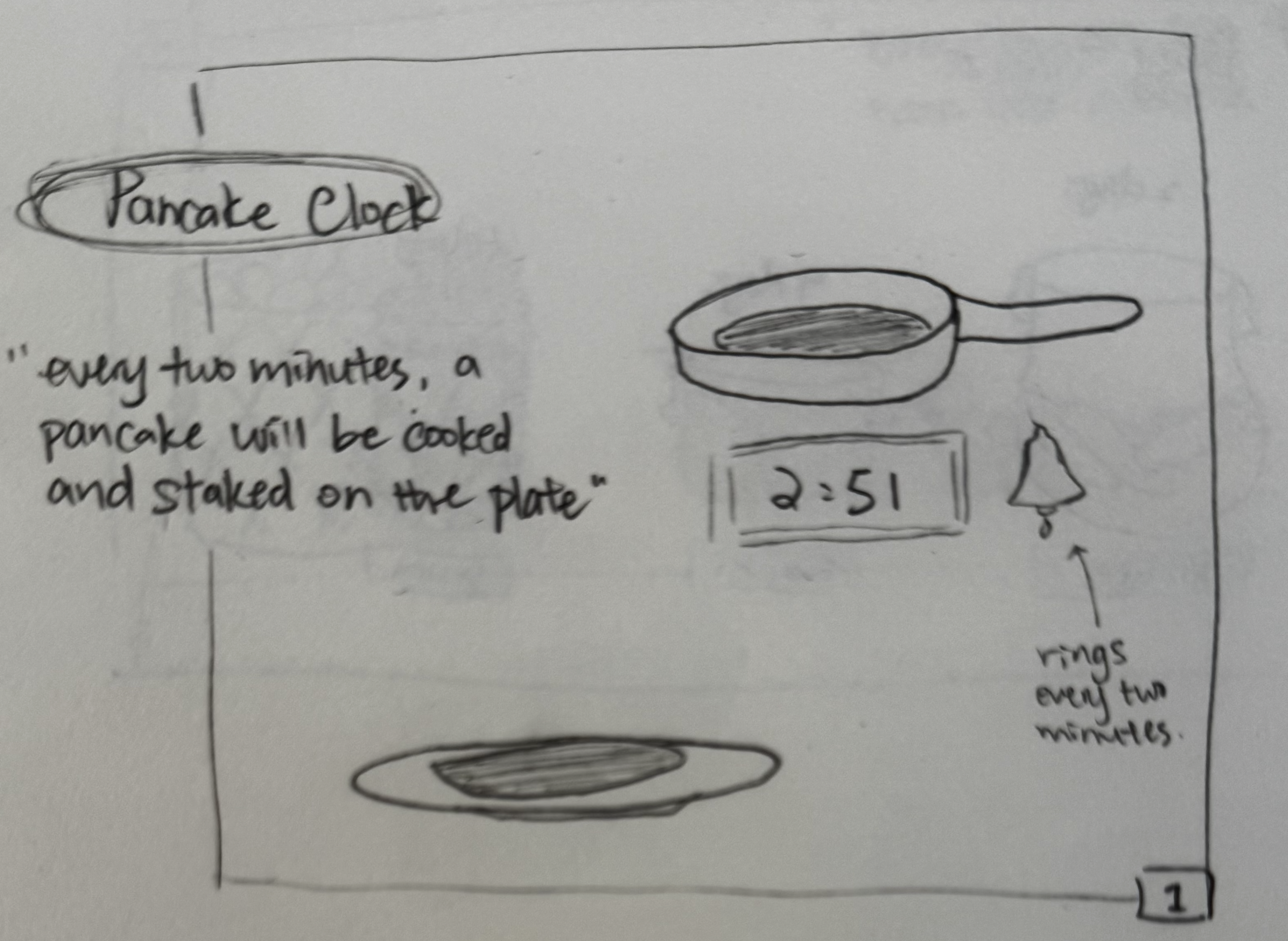
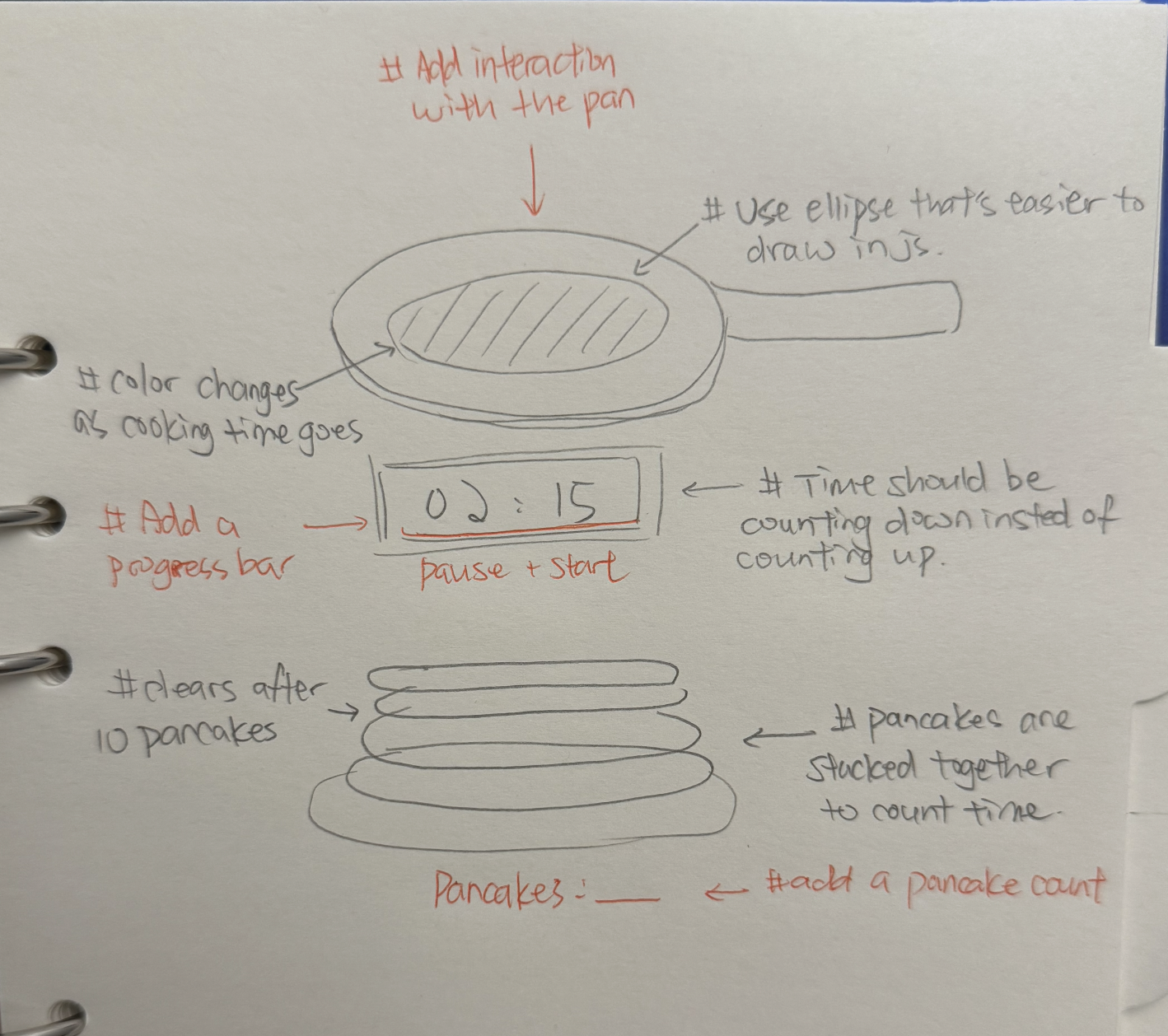
Context: This clock is designed for people who love making pancakes. It works as a fun, visual timer to use while cooking, helping users track how long their pancakes have been frying through animation and color changes.

Ex 12

Design process: For my pancake clock, I designed the layout as a pancake cooking simulator. It shows a pan frying pancakes and then dropping them onto a plate, which makes the whole clock feel like a small kitchen scene. The animation was an intentional choice because it imitates a real cooking environment and makes the passage of time more visual and engaging.

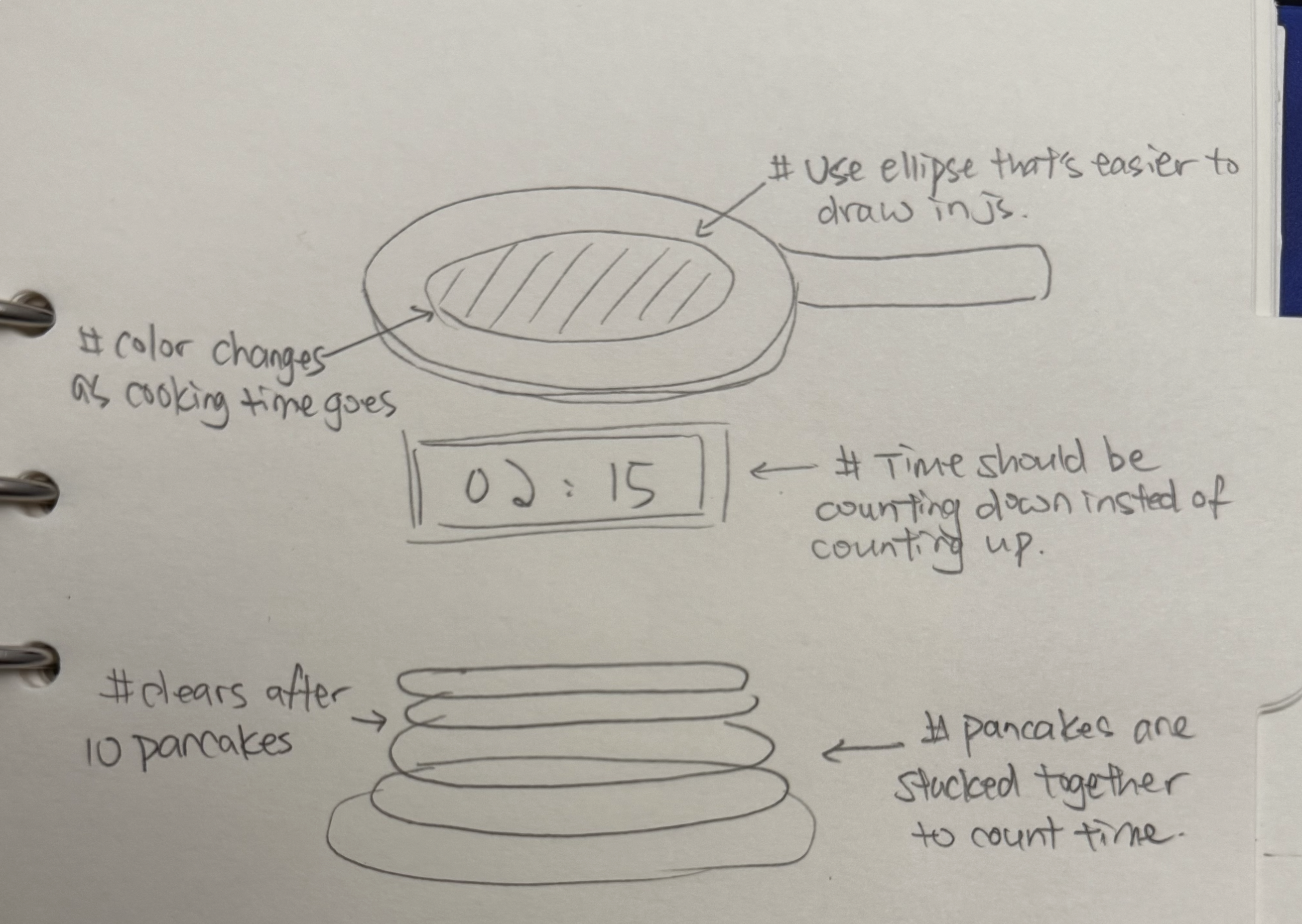
The color change of the pancakes is another key design choice. They start light and gradually turn golden brown as time passes. This helps people understand how long the pancake has been cooking without needing to read numbers, giving a more natural sense of time. I also added a countdown counter below the plate to give users a clear, easy-to-read time reference, balancing fun visuals with functional feedback.

Since I wasn’t able to hand-draw detailed pancakes due to limited time, the visuals could have looked more polished if I had more time to refine them. I also chose warm, high-contrast colors (browns and yellows) for better visibility and accessibility.

Self-reflection / future work: In the future, I would like to add more realistic pancake textures and steam effects to make the cooking scene feel livelier. I also plan to add features like letting users flip the pancakes with a click to include simple interactivity.
Sketch evolution

Ex 12 sketch evolution step 1
Step 1 — initial layout and annotated design decisions
Ex 12 sketch evolution step 2
Step 2 — second layout after peer feedback
Ex 12 sketch evolution step 3
Step 3 — refined visuals and annotations

more details next week